Portal Home > Knowledgebase > VOS2009 - Chinese interface > VOS2009 - How to play with demo switch
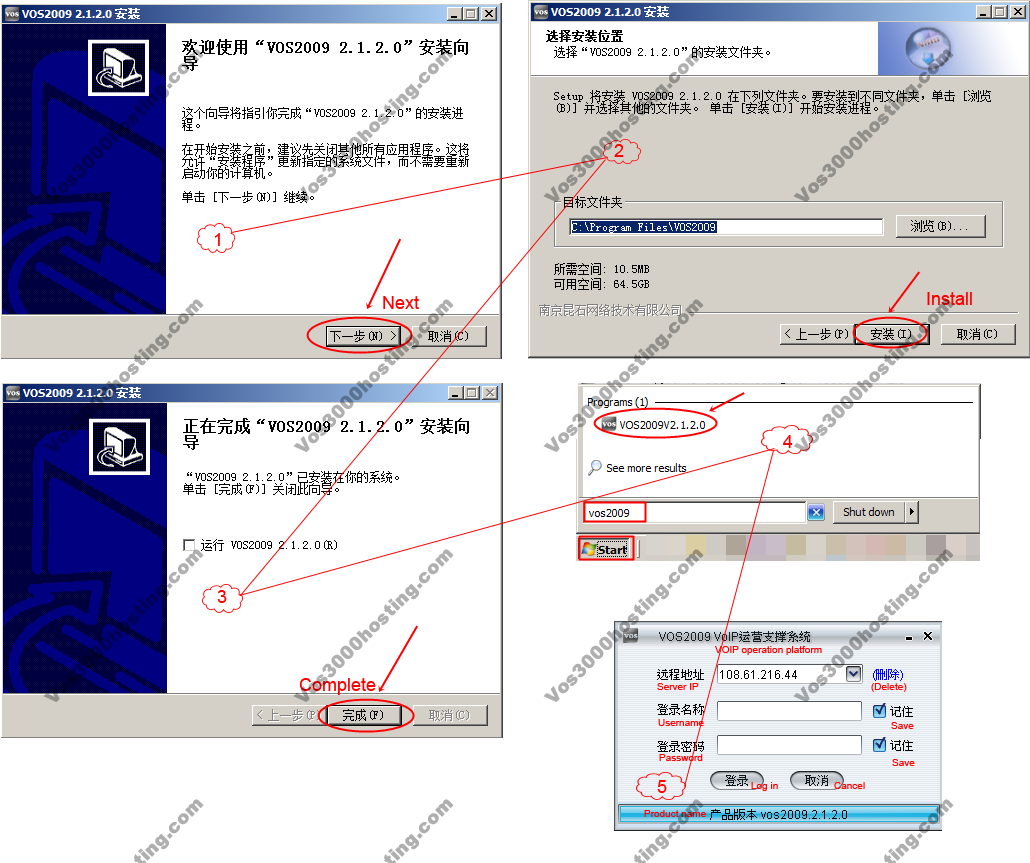
1. Install client software to operate switch remotely
If you have no Vos2009 V2120, you must download from HERE and install it on your Windows PC. Note that Vos2009 V2120 has no English version.
After download file VOS2009-Client2120-Chinese.exe completed, run it and you can follow setup guide below to complete installation.
2. Log in and play demo
Demo server information
Server IP: 108.61.216.44
User name: demo
Password: demo
3. TroubleShooting
In case, if you run client software, you see "Java runtime error" you need to download and install JRE, see more https://clientarea.vos3000hosting.com/knowledgebase.php?action=displayarticle&id=20
 Add to Favourites
  Print this Article